
Knowledge Management
Verified answers
Verified answers
Verified answers are bite-sized answers for common questions your employees might have. Atom will surface these answers as is, without changing a word. All verified answers in a workspace are stored in a folder called "Verified answers".
If Atom finds an answer in a document you've uploaded or in a knowledge management software you've connected and another one in the Verified Answers folder, it will prioritize the verified answer and surface that as the answer to the employee.
Add a verified answer from the Atomicwork portal
-
Go to Settings > Enterprise AI > Knowledge library. Select Organization to apply this across the organization, or select a workspace to apply it to that workspace only.
-
Click Verified answers. All verified answers are stored in this folder, no matter where you add it.
-
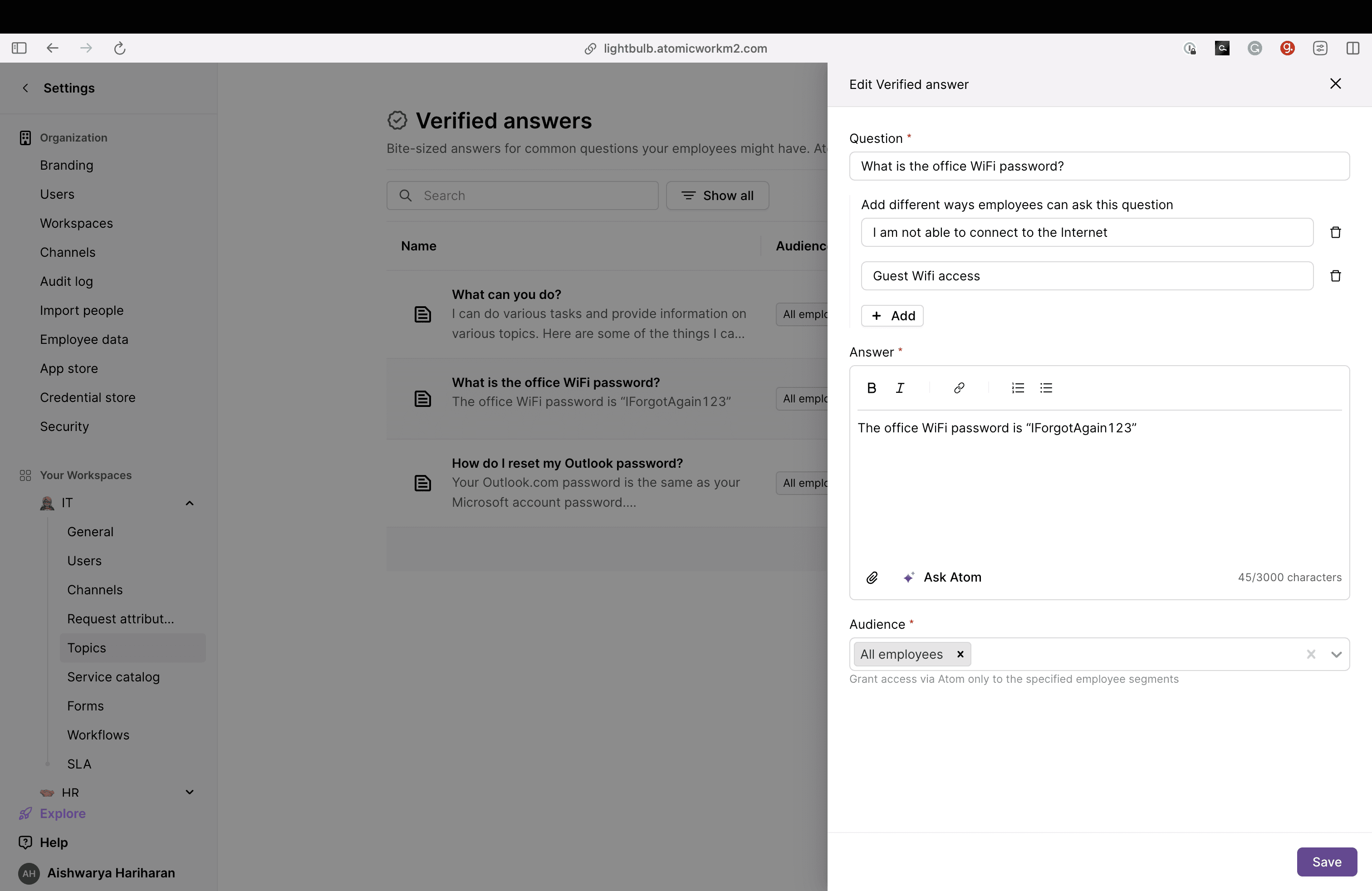
Click Add an answer. You can add a Q&A pair here so Atom knows what to keep an eye out for. Answers can be 3000 characters or shorter and can have links. You cannot add an image to an answer.
- You can also add variations of questions so Atom knows what to keep an eye out for.
-
You can also upload an attachment.
-
Choose the segment for the answer. Atom will respond with this answer only to relevant segments. All other end users will be directed to another answer or asked to create a request.
To start from an existing verified answer instead of writing one from scratch, open its three-dot menu (⋮) and select the Clone option, then adjust what you need.